
Prumo · AI for furniture and metalwork factories · Technology by ArtorIA
AI proposes.
People confirm.
How I designed the way a 100-person factory and its AI work together: the floor reports by voice note, Prumo drafts the update, and every important change waits for a person’s yes.
- ~10,000 m²first client's factory
- 100+people on the operation
- WhatsAppthe only tool the floor needs
- Near-dailyfeedback cycles with the client
The problem
The owner found out about a delay once it was already a loss.
Every project moves through cutting, metalwork, painting, glass, varnish and assembly, each with different people, documents and suppliers. The information lived in three places:
- WhatsApp chats
- Spreadsheets
- People’s heads
The founder had a working prototype, but no design system and screens where everything competed for attention. And there was one hard constraint: factory workers don’t want a new system.
Who it serves
Four people, four questions
- Leadership
“What's at risk, and does the real cost still fit the budget?”
- Purchasing
“What do I need to quote, and who's holding up the project?”
- Designers
“Does the 3D match the 2D, and where is this part?”
- Factory floor
“How do I report my work without learning a new system?”
Where should I look first?
The projects screen answers in seconds. It’s a to-do list for the owner’s attention.
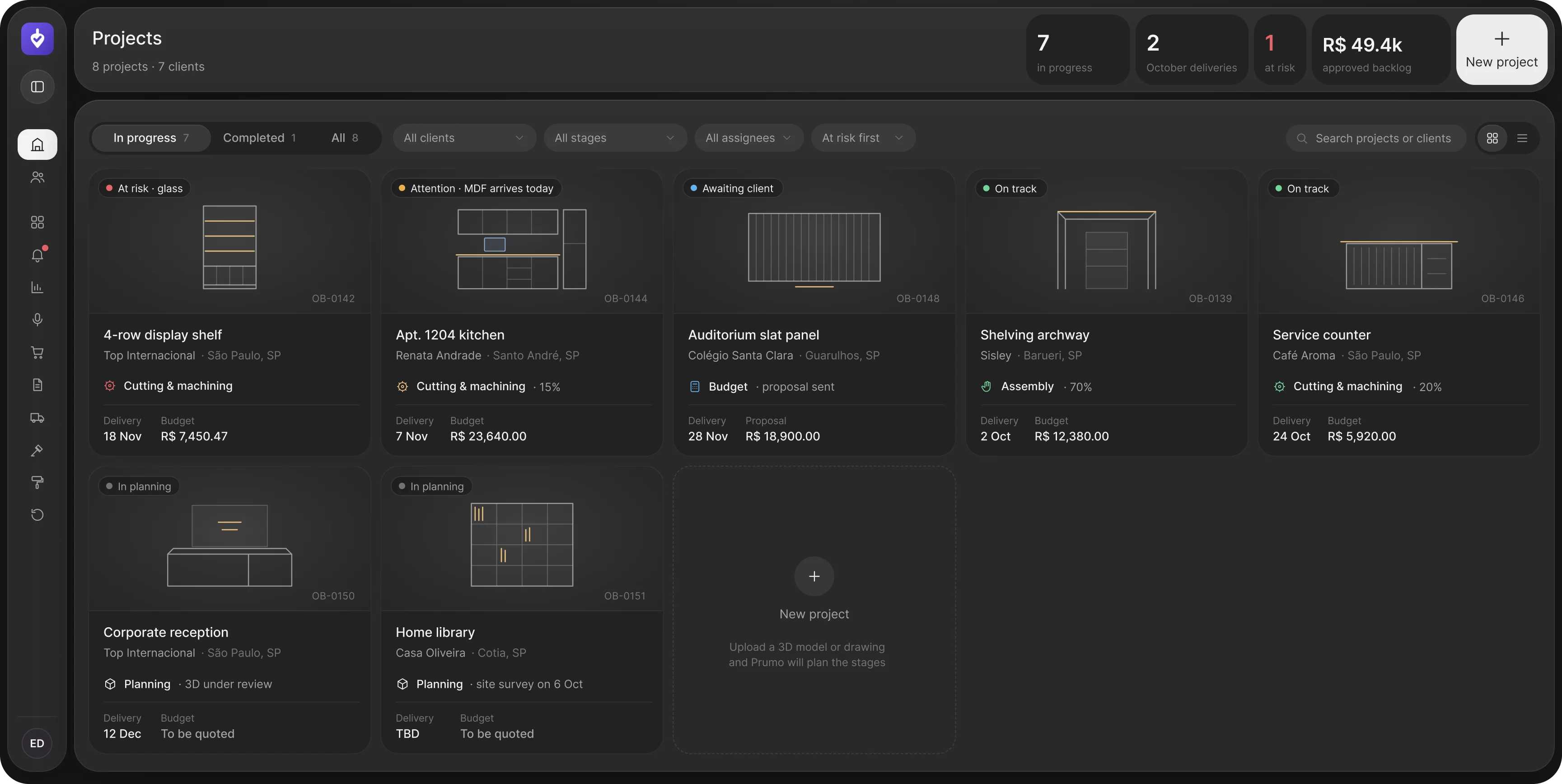
- Status in plain words
“At risk · glass” tells you what's wrong and where. No code to decode, no chart to read.
- Risk first, by default
The list sorts itself by what needs attention, so the owner doesn't have to go looking.
- Four numbers, no more
Projects running, deliveries this month, projects at risk and approved value. The rest is one click away.
- Starting a project is one drop
Send the 3D or the drawing and the engine plans the stages for you to review.
What am I building, and what will it cost?
One project, one screen: the model, the drawing, the parts and the budget stay together.
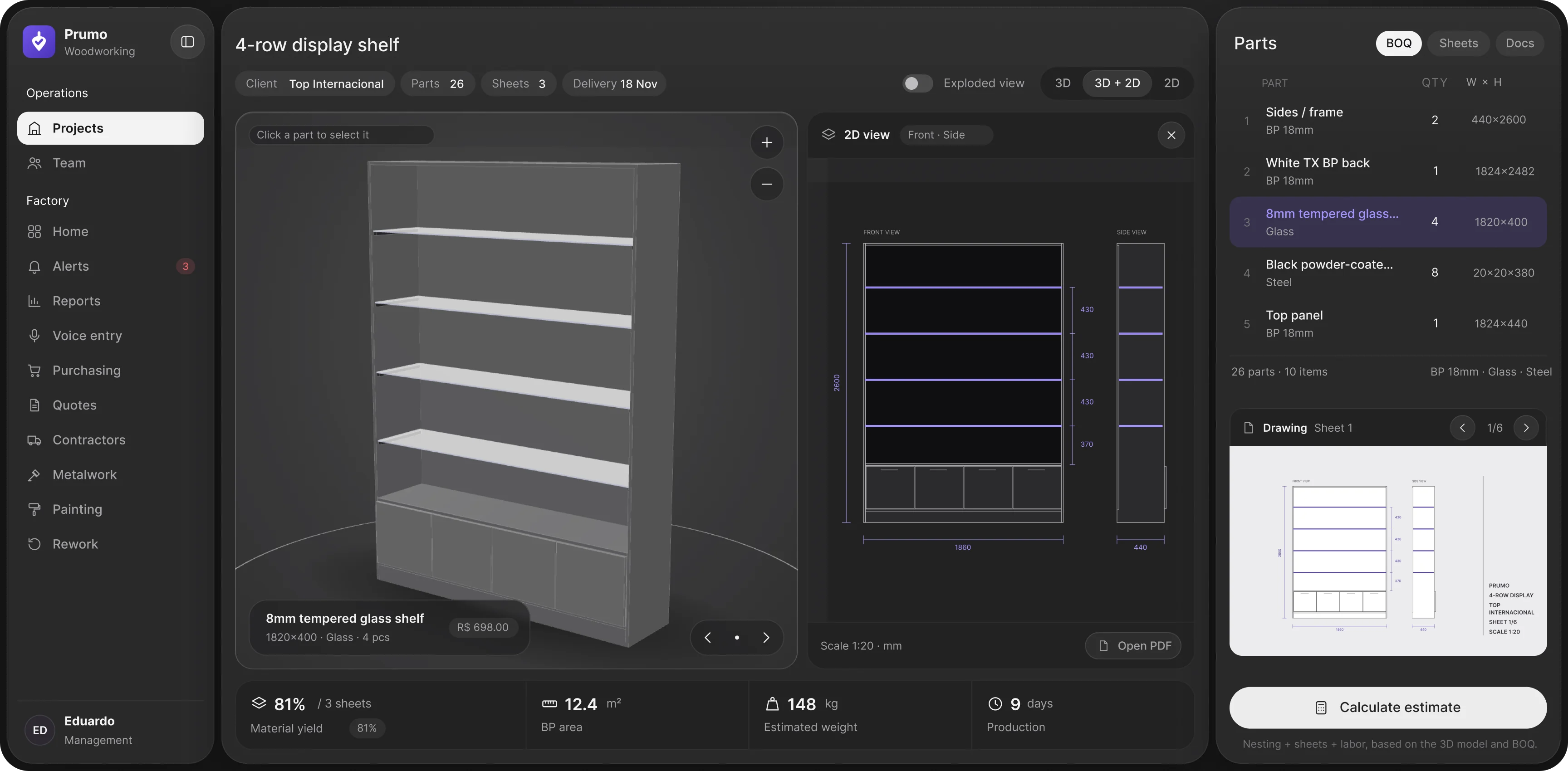
- 3D, 2D or both
One switch compares the views, and the 3D gets the most space.
- One selection, everywhere
Click a part and its row lights up, with size and price.
- Numbers with context
Each part shows its cost right where you’re looking.
- The project's vital signs
Yield, area, weight and days, generated from the model.
- The budget starts here
The riskiest flow now runs inside the project, from the 3D.
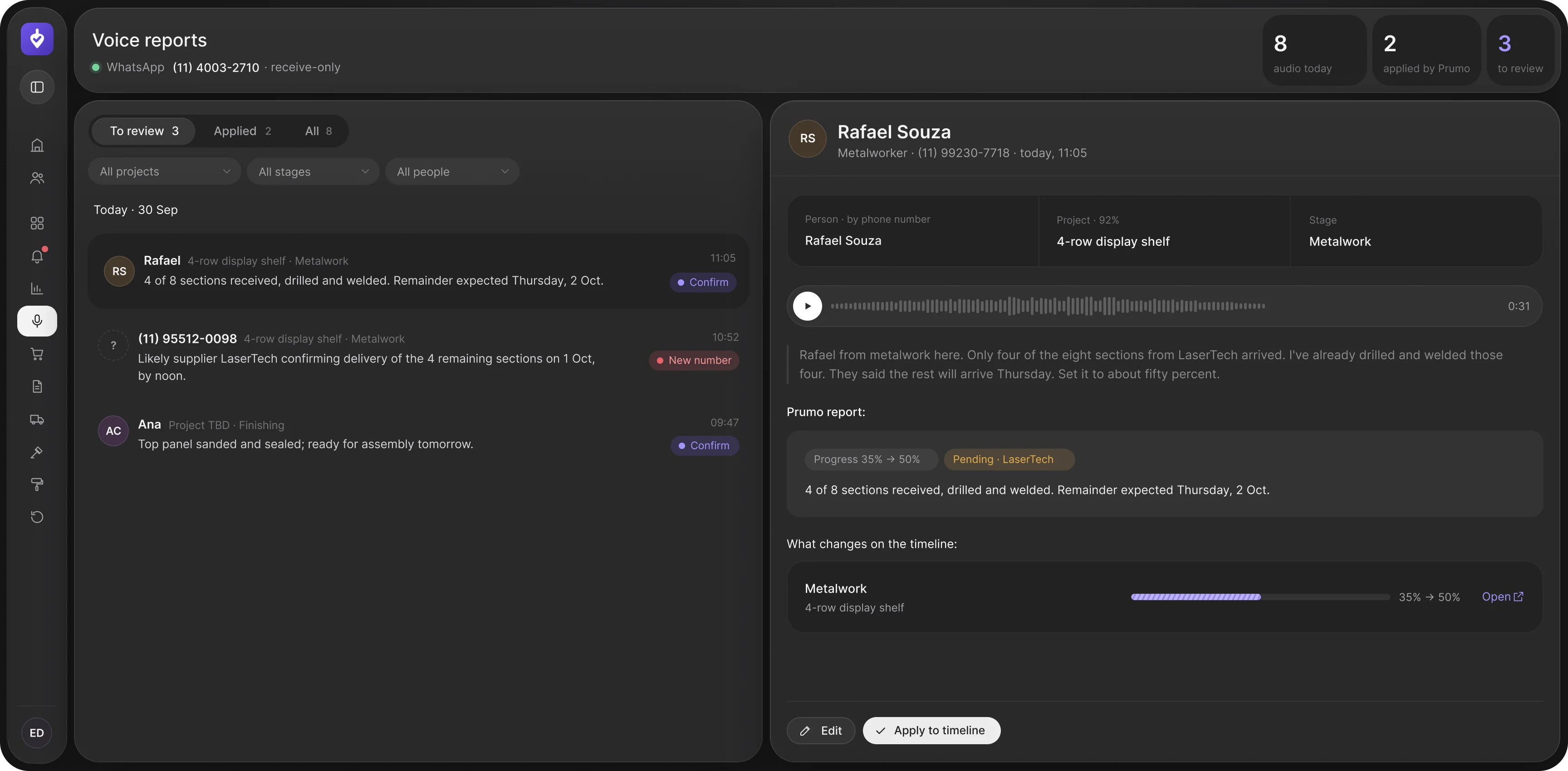
What happened on the floor today?
Workers keep doing what they already do: they send a WhatsApp voice note. The AI does the rest, and a person has the last word.
- Strangers don't get through
An unknown number changes nothing until someone identifies it.
- Confidence, field by field
You see what the AI is sure of: who, which project, which stage.
- The proof stays attached
The audio and transcript sit right above the summary.
- Preview before it happens
You see what changes on the timeline before anything moves.
- One click to say yes
Confirming takes a second. Reviewing should never feel like work.
Principles
Four rules behind every screen
- 1One screen, one question
How much does it cost, where does it stand, who is late. Everything else is one click away.
- 2AI proposes, people confirm
AI does the heavy lifting. Every important change passes through a person.
- 3Numbers come with context
Each value sits next to its budget, deadline or percentage, so nobody does the math.
- 4Color only means status
Green, yellow and red are never decoration, so they keep their meaning.
Where it stands
From loose features to a product that tells the story of every project.
Prumo is still in development, so there are no usage numbers yet, and I didn’t have direct access to users: I worked from the founder, the client’s profile and the existing prototypes, with feedback almost every day.
What I delivered: a continuous flow from the 3D project to delivery, the budget brought inside the project, a way to feed the system that doesn’t change the floor’s routine, and a design system the founder now uses to code the next screens.
The lesson I took with me: in AI products, trust is a design decision. It has to be drawn on the screen.